Article
AWS CodePipeline과 Slack Bot 완전 자동화 배포
개요
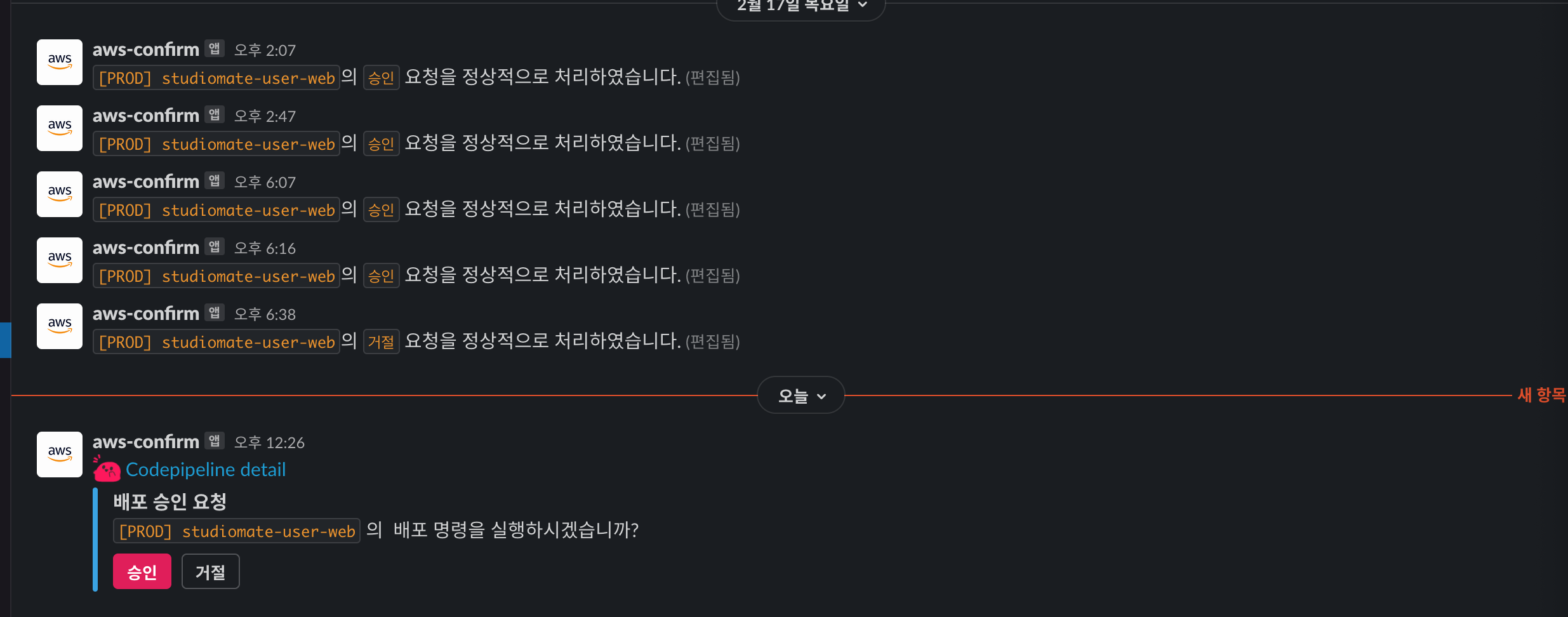
현대적인 DevOps 환경에서는 배포 과정을 최대한 자동화하면서도 중요한 단계에서는 인간의 개입을 허용해야 합니다. AWS CodePipeline과 Slack Bot을 결합하면 이러한 요구를 완벽하게 충족할 수 있습니다.
아키텍처 흐름도
GitHub push
    ↓
CodePipeline 트리거
    ↓
CodeBuild (Docker 빌드 & 테스트)
    ↓
SNS 알림
    ↓
Lambda → Slack API
    ↓
Slack Bot (승인 버튼)
    ↓
API Gateway
    ↓
Lambda (승인 처리)
    ↓
CodePipeline 승인
    ↓
배포 실행 (CodeDeploy)
    ↓
SNS 알림 → Slack (결과 보고)
1단계: CodePipeline 설정
CodePipeline 생성
AWS Management Console에서 CodePipeline을 생성합니다.
| 단계 | 설정값 |
|---|---|
| Source | GitHub (또는 CodeCommit) |
| Build | CodeBuild |
| Deploy | CodeDeploy (또는 ECS) |
| Approval | Manual Approval |
Source 단계: GitHub 연결
- AWS CodePipeline 콘솔 접속
- “Create pipeline” 클릭
- Source provider: GitHub 선택
- Repository와 Branch 선택
2단계: CodeBuild 설정
buildspec.yml 작성
version: 0.2

phases:
  pre_build:
    commands:
      - echo "Logging in to Amazon ECR..."
      - aws ecr get-login-password --region $AWS_DEFAULT_REGION | docker login --username AWS --password-stdin $AWS_ACCOUNT_ID.dkr.ecr.$AWS_DEFAULT_REGION.amazonaws.com
      - REPO_URI=$AWS_ACCOUNT_ID.dkr.ecr.$AWS_DEFAULT_REGION.amazonaws.com/my-app
      - COMMIT_HASH=$(echo $CODEBUILD_RESOLVED_SOURCE_VERSION | cut -c 1-7)
      - IMAGE_TAG=${COMMIT_HASH:=latest}

  build:
    commands:
      - echo "Building the Docker image on `date`"
      - docker build -t $REPO_URI:latest .
      - docker tag $REPO_URI:latest $REPO_URI:$IMAGE_TAG
      - echo "Running tests..."
      - docker run --rm $REPO_URI:latest npm test

  post_build:
    commands:
      - echo "Pushing the Docker image on `date`"
      - docker push $REPO_URI:latest
      - docker push $REPO_URI:$IMAGE_TAG
      - echo "Creating image definitions file..."
      - printf '[{"name":"my-container","imageUri":"%s"}]' $REPO_URI:$IMAGE_TAG > imagedefinitions.json

artifacts:
  files:
    - imagedefinitions.json
    - '**/*'
CodeBuild 프로젝트 생성
# AWS CLI를 통한 생성
aws codebuild create-project \
  --name my-app-build \
  --environment type=LINUX_CONTAINER,image=aws/codebuild/standard:5.0,computeType=BUILD_GENERAL1_MEDIUM \
  --service-role arn:aws:iam::ACCOUNT_ID:role/codebuild-role \
  --source type=GITHUB,location=https://github.com/user/repo.git
3단계: Slack 연동
SNS 토픽 생성
aws sns create-topic --name codepipeline-approval
Lambda 함수: SNS → Slack
Python 함수로 SNS 알림을 Slack 메시지로 변환합니다.
import json
import urllib3
import os

http = urllib3.PoolManager()
SLACK_WEBHOOK = os.environ['SLACK_WEBHOOK']

def lambda_handler(event, context):
    message = json.loads(event['Records'][0]['Sns']['Message'])

    slack_message = {
        'text': '배포 승인이 필요합니다',
        'blocks': [
            {
                'type': 'section',
                'text': {
                    'type': 'mrkdwn',
                    'text': f"*파이프라인*: {message['approval']['pipelineName']}\n*단계*: {message['approval']['stageName']}"
                }
            },
            {
                'type': 'actions',
                'elements': [
                    {
                        'type': 'button',
                        'text': {'type': 'plain_text', 'text': '승인'},
                        'value': 'approve',
                        'style': 'primary',
                        'action_id': 'approve_button'
                    },
                    {
                        'type': 'button',
                        'text': {'type': 'plain_text', 'text': '거부'},
                        'value': 'reject',
                        'style': 'danger',
                        'action_id': 'reject_button'
                    }
                ]
            }
        ]
    }

    encoded_msg = json.dumps(slack_message).encode('utf-8')
    resp = http.request('POST', SLACK_WEBHOOK, body=encoded_msg)

    return {'statusCode': 200, 'body': 'Message sent to Slack'}
4단계: API Gateway + Lambda (승인 처리)
API Gateway 설정
Slack의 대화형 메시지에서 버튼 클릭을 처리합니다.
Lambda 함수: Slack 버튼 → CodePipeline
import json
import boto3
import hashlib
import hmac
import time
import os

codepipeline = boto3.client('codepipeline')
SLACK_SIGNING_SECRET = os.environ['SLACK_SIGNING_SECRET']

def verify_slack_request(body, headers):
    """Slack 요청 서명 검증"""
    timestamp = headers.get('X-Slack-Request-Timestamp', '')
    signature = headers.get('X-Slack-Signature', '')

    if abs(time.time() - int(timestamp)) > 300:
        return False

    sig_basestring = f'v0:{timestamp}:{body}'
    my_signature = f"v0={hmac.new(
        SLACK_SIGNING_SECRET.encode(),
        sig_basestring.encode(),
        hashlib.sha256
    ).hexdigest()}"

    return hmac.compare_digest(my_signature, signature)

def lambda_handler(event, context):
    body = event['body']
    headers = event['headers']

    if not verify_slack_request(body, headers):
        return {'statusCode': 403, 'body': 'Unauthorized'}

    payload = json.loads(urllib.parse.parse_qs(body)['payload'][0])
    action_value = payload['actions'][0]['value']

    # CodePipeline 승인 토큰과 파이프라인명 추출
    # (Slack 메시지에 포함되어 있어야 함)

    if action_value == 'approve':
        codepipeline.put_job_success_result(jobId=job_id)
        response_text = '✅ 배포가 승인되었습니다.'
    else:
        codepipeline.put_job_failure_result(
            jobId=job_id,
            failureDetails={'message': 'Rejected by operator'}
        )
        response_text = '❌ 배포가 거부되었습니다.'

    return {
        'statusCode': 200,
        'body': json.dumps({
            'response_type': 'in_channel',
            'text': response_text
        })
    }
5단계: 배포 설정
CodeDeploy appspec.yml
version: 0.0
Resources:
  - TargetService:
      Type: AWS::EC2::Instance
      Properties:
        Tags:
          - Key: Name
            Value: deployment-target

Hooks:
  - BeforeInstall: "pre-install"
  - AfterInstall: "post-install"
  - ApplicationStart: "start-app"
  - ApplicationStop: "stop-app"
EC2 인스턴스 태그 설정
aws ec2 create-tags \
  --resources i-1234567890abcdef0 \
  --tags Key=Name,Value=deployment-target
6단계: IAM 권한 설정
CodePipeline 역할
{
  "Version": "2012-10-17",
  "Statement": [
    {
      "Effect": "Allow",
      "Action": [
        "codebuild:BatchGetBuilds",
        "codebuild:BatchGetReports",
        "codebuild:List*",
        "codebuild:DescribeTestReports",
        "codebuild:CreateReportGroup",
        "codebuild:CreateReport"
      ],
      "Resource": "*"
    },
    {
      "Effect": "Allow",
      "Action": [
        "sns:Publish"
      ],
      "Resource": "arn:aws:sns:*:*:codepipeline-*"
    }
  ]
}
Lambda 실행 역할
{
  "Version": "2012-10-17",
  "Statement": [
    {
      "Effect": "Allow",
      "Action": [
        "codepipeline:PutJobSuccessResult",
        "codepipeline:PutJobFailureResult"
      ],
      "Resource": "*"
    }
  ]
}
모니터링 및 로깅
CloudWatch 대시보드
aws cloudwatch put-metric-alarm \
  --alarm-name CodePipeline-Failures \
  --alarm-description "Alert on pipeline failures" \
  --metric-name PipelineExecutionFailure \
  --namespace AWS/CodePipeline \
  --statistic Sum \
  --period 300 \
  --threshold 1 \
  --comparison-operator GreaterThanOrEqualToThreshold
로그 확인
# CodeBuild 로그
aws logs tail /aws/codebuild/my-app-build --follow

# Lambda 로그
aws logs tail /aws/lambda/slack-approval --follow
트러블슈팅
| 문제 | 해결책 |
|---|---|
| CodeBuild 실패 | buildspec.yml 문법 확인, IAM 권한 확인 |
| Slack 메시지 미전송 | SNS 토픽 설정 확인, Lambda 함수 로그 확인 |
| 승인 버튼 작동 안 함 | Slack 서명 검증 로직, API Gateway 설정 확인 |
| 배포 실패 | CodeDeploy 에이전트 상태, IAM 역할 권한 확인 |
보안 고려사항
- 최소 권한 원칙: 각 IAM 역할에 필요한 권한만 부여
- Slack 토큰 관리: AWS Secrets Manager에 저장
- 서명 검증: Slack 요청의 진정성 확인
- 로그 암호화: CloudWatch 로그에 민감정보 기록 금지
마치며
CodePipeline과 Slack Bot을 통한 자동화 배포는 팀의 생산성을 크게 향상시킵니다. 배포 시간이 단축되고, 배포 과정이 투명해지며, 인적 오류가 줄어듭니다. 이 방식을 통해 개발팀은 비즈니스 로직 개발에만 집중할 수 있고, 운영팀은 배포 프로세스를 자신있게 관리할 수 있습니다.
댓글